 This
is just a short article / review on the Phottix Odin Wireless TTL Trigger Set.
I’ve been using off-camera flash with various wireless flash triggers for over
ten years now, mostly for fill flash type scenarios at weddings or on
occasional portrait sessions. Every pro or semi-pro photographer has known that
for years the Pocket Wizards were always the cream of the crop. For my shooting
style they tended to be on the expensive side, but they were ultra-reliable and
also one of the first units to offer full TTL functions.
This
is just a short article / review on the Phottix Odin Wireless TTL Trigger Set.
I’ve been using off-camera flash with various wireless flash triggers for over
ten years now, mostly for fill flash type scenarios at weddings or on
occasional portrait sessions. Every pro or semi-pro photographer has known that
for years the Pocket Wizards were always the cream of the crop. For my shooting
style they tended to be on the expensive side, but they were ultra-reliable and
also one of the first units to offer full TTL functions.
I’ve
always been conservative (on the cheap side) when it comes to buying new gear
and I need enough gear to trigger at least two flashes. I’m also a Canon guy so
when Canon announced their wireless flash triggers, the Canon ST E3 RT and the
600 EX RT Speedlites, I almost went right out and purchased them. I really
liked the new function screen on the commander unit, but to be honest, the
price was still a major issue because if I wanted to trigger two flash units I
was looking at spending well over $1300. In order for them to be fully functional,
I needed to upgrade my flashes and get a TCU unit (the ST E3 RT).
When
Phottix first announced they were coming out with a totally wireless flash
system with TTL capabilities about a year earlier, I really wasn't in the
market for a new system. I sort of put their system in the back of my head for
awhile. I had been using Phottix Atlas flash triggers for a couple years, and
knew they were reliable, but my units had no TTL capabilities so basically all
they could do was fire my flashes.
The main feature I liked on
the new Canon was that you could change any of the settings right from the
camera without having to physically make changes on the flashes themselves. Then I remembered the Phottix Odin system, which could also do the same. Whenever I purchase any new product, I like to wait until they've been
battled tested in the real world, so I went online and read the reviews for the Odin system to see how they held
up. Not only could the Phottix do all the same things the Canon could do, I could keep my current flashes and that alone would save over $1000. So that was enough for me to purchase the Phottix Odin system and after using them for awhile, I knew it
would be a very long time before anything else came close to these units.
I’ll be the first to
tell you, they just work. Every time, no exceptions. They’re rated at 320 feet
range and I believe it. Just for the heck of it I had tested my old Atlas triggers and they fired at over 300 feet. In my opinion, the Odins are just about the best
thing since sliced bread. With these units you have access to 4 channels and 3
groups, plus they can sync with your camera’s shutter (high-speed sync) up to
1/8000 second. They allow you to raise or lower the power, switch from TTL to
manual, adjust the zoom and set ratios if you want, all from your camera. The screen on the TCU is easy to read and all the units work on AA
batteries. Another feature of the Odin
wireless system is the addition of a USB port and a USB cable so you can install firmware
updates. The Odins come complete with a 3.5 sync cable, and a 3.5 to 3.5 adapter, a
6.3 adapter for studio strobes and even a lanyard. The
transmitter also features a backlit LCD screen for viewing in low-light conditions
and modeling flashes that can be activated right from the transmitter. There is even
a switch so you can use second curtain sync!
I've been using the Odin system for over a year in the field
with my 580 EXII’s and they've been great. To date, these are the easiest and most
reliable triggers I've ever owned. The the real benefit is being able to make
all my flash adjustments without touching the flashes. Just dial the power up/down for
each flash right from the LCD screen and keep shooting. Using the Phottix Odin system couldn't
be simpler and I would personally recommend them to anyone. The last time I
checked they were available for use with Canon, Nikon and Sony. The prices
can’t be beat either. You can get a set-up for one flash for about $329 or a
set-up with two receivers for only $399.
If you’ve been thinking about picking up a set, you won’t be sorry. Great system, great prices……..Remember, keep shooting and have some fun!


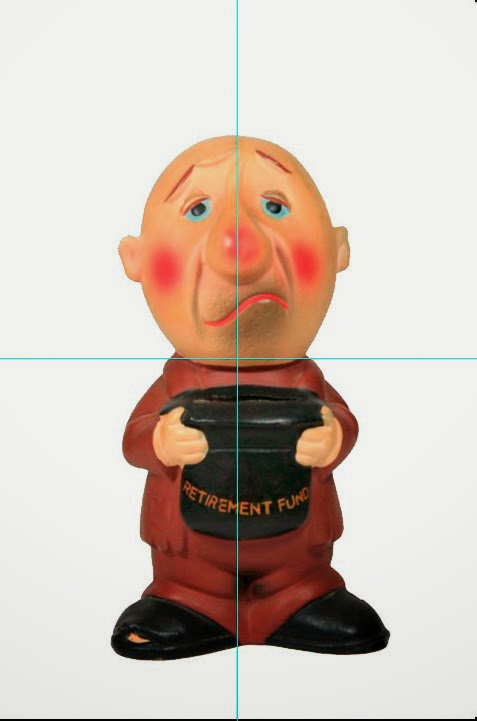 Someone
asked me what was the easiest way to find the exact center in an image. This post
is on how I do it, and it’s as simple as tapping one key on my keyboard. Here’s
a quick tutorial to help you create an action that’ll help you find the exact
center of an image by pressing one key.This is one of those actions that I use
all the time. I hope you enjoy it.
Someone
asked me what was the easiest way to find the exact center in an image. This post
is on how I do it, and it’s as simple as tapping one key on my keyboard. Here’s
a quick tutorial to help you create an action that’ll help you find the exact
center of an image by pressing one key.This is one of those actions that I use
all the time. I hope you enjoy it. 

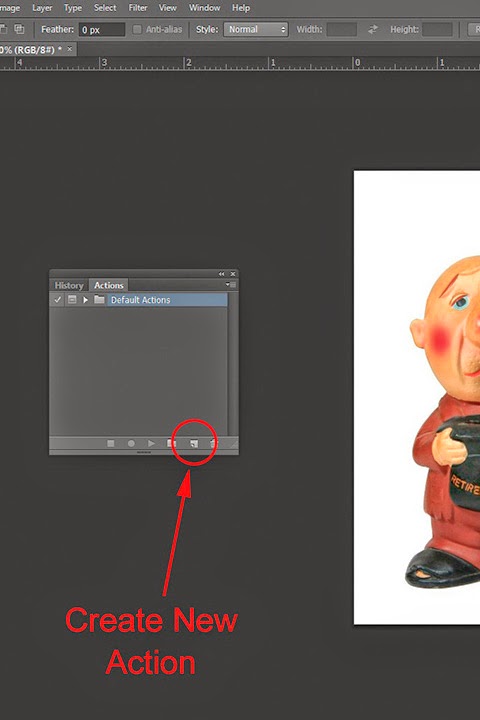 Now
click on Windows and in the drop down menu, click on Actions. At the bottom of
that panel, click the button next to the Trash can and a New Action dialog box
will open.
Now
click on Windows and in the drop down menu, click on Actions. At the bottom of
that panel, click the button next to the Trash can and a New Action dialog box
will open. 


